How to Build an AI-First Help Center That Deflects 60% of Support Tickets

An AI-first help center is a knowledge base that an AI agent reads, answers from, and keeps up to date for you. The B2B teams hitting a 60% ticket deflection rate in 2026 all share four properties: their help center content is fresh, the AI is grounded in the same sources engineering uses, search feels conversational, and the help center is embedded in the product. Productlane is built around this. The help center auto-drafts articles from completed Linear issues, reads the linked GitHub commits and PRs for the actual diff, and learns from past conversations to cover the questions customers actually ask. This guide walks through what changed, the four properties in detail, a five-step framework for building one, and answers to the questions we hear most from teams migrating from a static knowledge base.
Help centers used to be a side project. A handful of articles written once, linked from the footer, and lightly maintained when someone remembered. In 2026, the help center is the single biggest lever on support cost, because it's the input the AI agent reads to answer customer questions. A help center that's fresh, accurate, and broad is the difference between deflecting 60% of tickets and deflecting 15%.
The headline number teams talk about is the deflection rate: the share of incoming customer questions an AI agent resolves end-to-end without a human in the loop. Plain reports n8n hitting 60% with an AI-first support strategy. Intercom's Fin and Help Scout's AI agent benchmark in the 60 to 73% range. On Productlane today, the AI agent fully resolves roughly 1 in 3 incoming conversations and drafts a reply in seconds on most of the rest. Every team we've watched climb past 50% has done the same three things: invested in help center content, wired the AI to fresh sources, and embedded the experience inside the product.
This guide is a practical read on how to build an AI help center that actually deflects tickets, what to look for in AI knowledge base software, and how Productlane's self-updating help center is architected so the content stays fresh as your product ships.
What is an AI-first help center?
An AI-first help center is a knowledge base built around the assumption that an AI agent is the primary reader. Humans still read articles, and the design still has to be beautiful, but every structural decision optimizes for grounding: how easy is it for the agent to find the right passage, attribute it, and turn it into a correct answer?
In practical terms, three things change versus a traditional knowledge base:
- Content is structured for retrieval. Short articles with clear titles, one question per page, code samples and screenshots that the agent can cite. Long multi-section walls of text are split.
- Content stays in sync with shipped work. The agent that answers questions about a feature should be reading docs that reflect what shipped this week, not last quarter.
- The help center is reachable from inside the product. The deflection happens in-app, in the moment of confusion, not after a customer has already opened a ticket.
The 60% deflection benchmark: what counts and what doesn't
The phrase "ticket deflection" gets thrown around loosely. Vendors quote numbers from 30% to 80%. Two definitions matter:
Resolution rate (the honest metric)
The share of incoming conversations where the AI agent gave a complete, correct answer and the customer didn't come back with a follow-up or escalation. This is what Intercom's $0.99-per-outcome and Productlane's $0.79-per-resolution pricing both bill against. It's the number that actually maps to headcount savings.
Containment rate (the noisy metric)
The share of sessions that ended without a human handoff. This includes customers who simply gave up. Containment looks great in a demo and tells you very little about whether anyone actually got their answer.
When we say 60% deflection, we mean resolution rate. The teams hitting it run on the four properties below.
The four properties of an AI-first help center
Every AI help center that consistently deflects more than half its inbound volume in 2026 shares the same four properties. Audit your current setup against this list before changing tools.
1. Content that's fresh by default
The fastest path to a low deflection rate is documentation that drifts. The customer asks about a feature that shipped last week, the agent retrieves an article describing the version from six months ago, and the answer is technically grounded but practically wrong. Treat freshness as a first-class property of the help center, the way an engineering team treats green CI. If your docs depend on a human remembering to write them after every release, they will drift.
2. Grounding in the same sources engineering uses
The AI agent should read from the same source of truth your engineers do: shipped Linear issues, merged GitHub pull requests, and the actual product behavior. Bolting an AI agent onto a static help center is the most common mistake teams make when they migrate. The result feels like a chatbot reading a PDF. The fix is wiring the agent into the same systems your team writes code in.
3. Search that feels conversational
Customers in 2026 expect to type a full question and get a direct answer, with the article cited underneath. The old-school keyword search experience (type two words, scan ten links) belongs to a different decade. An AI knowledge base should default to conversational search at the top of the help center, with article browsing available for the customers who still want it.
4. Embedded in the product
The highest deflection happens before a ticket exists. A customer hovers over an unfamiliar setting, opens the in-app widget, asks a question, and gets a grounded answer with a link to the relevant article. The conversation is over in 20 seconds and no ticket is created. If your help center lives only on a separate subdomain, you're missing the highest-leverage deflection surface you have.
How Productlane's AI help center stays fresh automatically
We built the Productlane help center around the four properties above. The piece teams ask about most is the self-updating part, so here's exactly how it works.
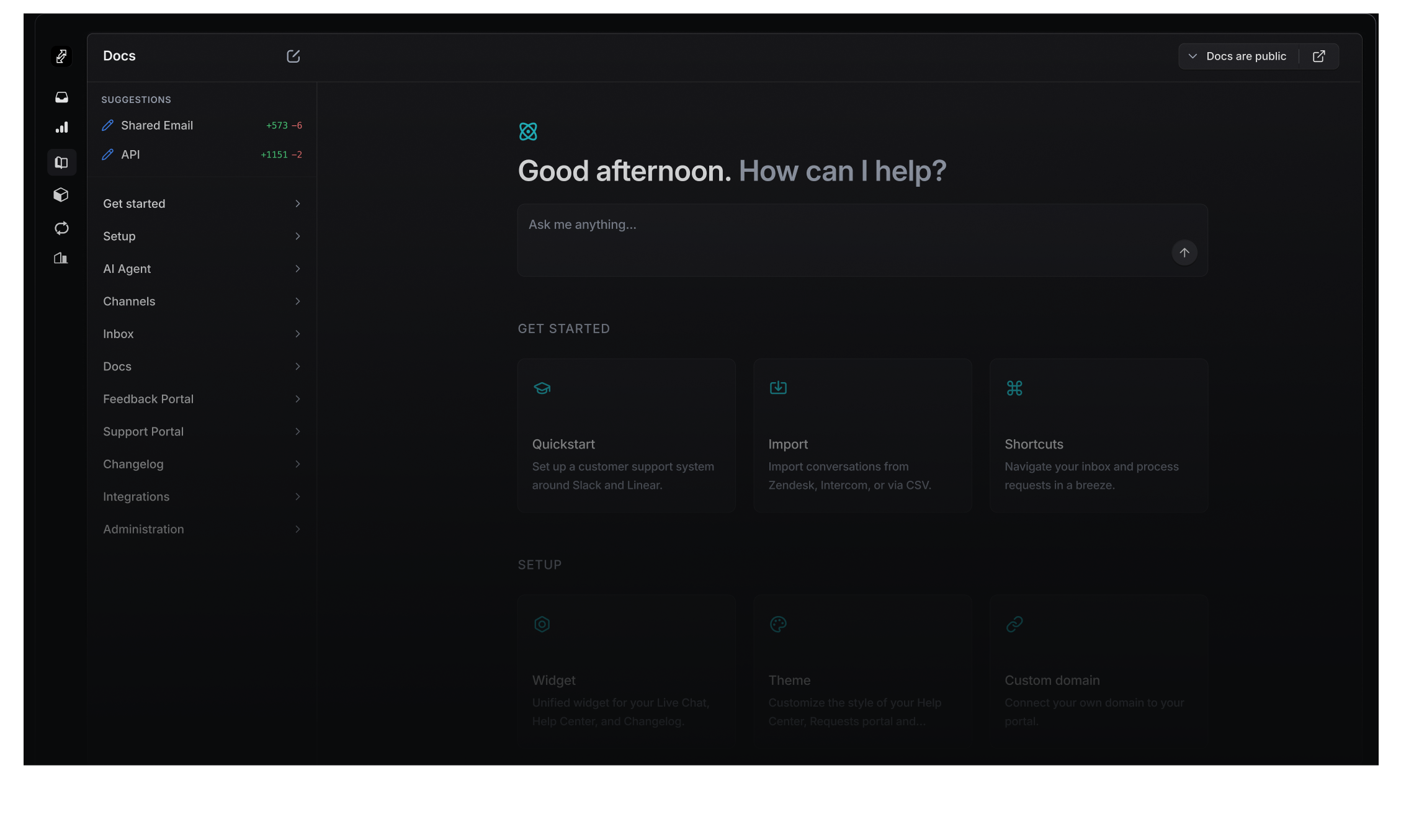
The Productlane help center: conversational search at the top, articles underneath, grounded in your Linear workspace and the new GitHub integration.
Linear issues are the trigger
When a Linear issue is marked Done, Productlane checks whether the customer-facing surface area changed. If it did, it kicks off a help center draft. Your support team gets a proposed article (or update to an existing one) with a one-click approve in the Productlane editor. The end state is a help center where articles reflect what actually shipped, on the same day it shipped, with a human still in the loop on the wording.
The new GitHub integration provides the diff
This is the piece we shipped most recently. Connect a GitHub repository to your workspace, and the AI reads the pull requests linked to your Linear issues: the commit messages, the file diffs, and the actual code that changed. That gives the help center draft real grounding instead of guessing from the issue title. A bug fix that changed two API parameters becomes a docs update that lists those two parameters. A new endpoint becomes an article with the right request and response shape. The integration is read-only and scoped to one repository per workspace.
Past conversations close the loop
Every conversation your support team handles becomes signal. Productlane surfaces a weekly summary of the questions customers asked the AI agent and the searches that returned nothing useful. That list is your highest-ROI docs backlog: write those articles first, and your deflection rate moves visibly the next week. The AI agent itself also retrieves from past resolved conversations, so a one-off answer your team gave in Slack becomes context the agent can reuse the next time the same question lands.
The agent and the help center share one brain
The same AI that powers your in-app AI agent reads the help center, the linked GitHub PRs, your past conversations, and your Linear workspace. That means a reply the agent drafts in the inbox uses the same source material a customer sees when they open the help center widget in your app. No two parallel knowledge bases drifting apart.
Embedded in 47 languages, on your domain
The help center embeds directly in your app via the Productlane widget. Customers see content in their browser language across 47 languages, automatically translated. Host it on your own domain, track which articles get traffic with Google Analytics, and link to specific pages from product tooltips. This is the surface where most of your deflection happens, so it has to feel like part of your product.
How to build an AI-first help center in five steps
The order matters. Teams that skip step 1 and start with the AI agent get a polished bot that hallucinates. Teams that follow the sequence below typically pass 50% resolution within 60 days and 60% within 90.
- 1
Audit your top 50 tickets
Export the last 90 days of resolved conversations and group them by topic. The top 20 topics typically cover 60 to 80% of volume. That list is your initial help center backlog. If you already have a help center, score each existing article against the top topics; gaps and stale articles are your first writing assignment.
- 2
Write for the AI as much as for humans
One question per article. A short, clear title that matches how customers actually phrase the question. Code samples that copy cleanly. Screenshots with descriptive alt text. Avoid burying the answer 600 words in. The retrieval model will reward concise, well-titled passages, and so will your readers.
- 3
Wire the agent to live sources
Connect your Linear workspace and GitHub repository so the help center stays in sync with shipped work. Connect your support inbox so past conversations become retrievable context. Without these three connections, you have a chatbot reading a PDF, which is the setup that produces sub-30% deflection rates.
- 4
Embed the help center in-app
Install the widget on the product screens where customers get stuck most often. Link to specific articles from tooltips and empty states. Most of the deflection moves into the in-app surface, where customers find answers before opening a ticket.
- 5
Review the weekly question report
Every week, read the list of questions the AI agent couldn't answer confidently. Each one is a docs gap or a product fix. Write the missing articles, file the product issues in Linear, and watch the deflection rate climb week over week.
What our customers say
"Our customers consistently get a real 'wow' experience when we showcase our support portal, roadmap, and communication workflows. It has really helped make our software feel much more mature and transparent."
"The speed at which these guys develop new features is crazy! Productlane is truly one of those products where you feel like the team behind is reading your mind."
Frequently asked questions
An AI help center is a knowledge base built so an AI agent can read it, answer customer questions from it, and keep it in sync with the product. The articles are still readable by humans, but the structure (short articles, one question per page, clear titles, code samples) is optimized for retrieval. A good AI help center pairs with an AI support agent that answers from the same source.
Realistic resolution rates in 2026 are 50 to 70% for B2B SaaS teams that invest in fresh content, grounded retrieval, and in-app embedding. Sub-30% means the agent is reading stale or thin docs. Above 75% is rare outside of high-volume ecommerce-style workloads (password resets, lost orders, refund requests) where most tickets are highly repetitive.
Resolution rate measures how often the AI gave a complete, correct answer the customer accepted. Containment rate measures how often the session ended without a human handoff, including customers who gave up. Resolution is the honest number. Containment looks great in demos and tells you very little.
Yes, with a human in the loop on wording. When a Linear issue is marked Done, Productlane reads the linked GitHub commits and pull requests for the diff, drafts the help center article (new or updated), and surfaces it for one-click approval. The end state is a help center where articles reflect what shipped this week, and your support team spends minutes per release on docs instead of hours.
Connect a GitHub repository to your Productlane workspace via GitHub App OAuth. Productlane reads pull requests, commit messages, file diffs, and source code from that repository in a read-only mode. That context flows into help center drafts and into the AI agent's replies, so answers cite what actually changed in the codebase rather than guessing from a ticket title.
Yes. Productlane help centers run on your own domain by default. The widget that embeds the help center inside your app, the public help center site, and the AI search all inherit your branding. Built-in Google Analytics tracks the articles that get traffic, and content is auto-translated across 47 languages based on browser language.
Pylon and Plain are strong on Slack-first B2B support inbox workflows; both run their own ticket model rather than treating Linear as the source of truth, and have thinner customer-facing help center surfaces. Featurebase has a well-known AI knowledge base product and is strong on the feedback and roadmap side. Productlane is the deepest fit for teams who want one tool that ties the AI help center, the AI support agent, Linear, and the new GitHub integration into a single self-updating system, with $0.79 per-resolution AI pricing.
Most teams we've watched migrate are live within a week: a day to import existing articles, a day to connect Linear and GitHub, a day to install the in-app widget, and a few days of writing the articles that close the biggest gaps from the ticket audit. Hitting 60% resolution typically takes a further 60 to 90 days of weekly iteration on the missing-question report.
Building an AI help center you can ship on this quarter
The teams hitting 60% deflection in 2026 treat the help center like a product surface, with the same release cadence and the same quality bar as the rest of the codebase. Fresh content, grounded retrieval, conversational search, and in-app embedding are the four levers. Pull all four and the deflection rate follows.
Productlane is the support platform we wanted to use ourselves: a self-updating help center that reads from your Linear workspace and the new GitHub integration, an AI support agent at $0.79 per resolution, an in-app widget in 47 languages, and a public help center on your own domain. All in one tool, with the inbox, portal, and changelog included.
You can read more about the help center, see how the AI agent works, check pricing, or try Productlane for free. If you're weighing options, our guide to the best customer support tools in 2026 covers the broader category in detail.